
The functionality of an access control system
- agathatendo
- Sep 16, 2025
- 3 min read
An access control system relies on two fundamental security concepts that work hand-in-hand: “authentication and authorization.” While these terms are often used interchangeably, they serve distinctly different purposes in protecting your business assets.
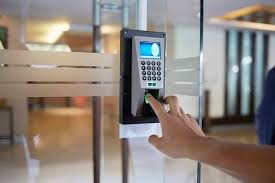
What is Authentication?
Authentication answers the question: "Who are you?"
Authentication is the process of verifying the identity of a user, device, or system attempting to access your resources. It's the digital equivalent of checking someone's ID at a secure building entrance.
Common Authentication Methods:
Something you know: Passwords, PINs, security questions
Something you have: Smart cards, mobile phones
Something you are: Fingerprints, facial recognition, iris scans, voice recognition
Multi-Factor Authentication (MFA): Combining two or more authentication methods
Real-World Authentication Example:
When you swipe your employee card and enter a PIN at your office door, you're providing two forms of authentication – the card (something you have) and the PIN (something you know).
What is Authorization?
Authorization answers the question: "What are you allowed to do?"
Once your identity is confirmed through authentication, authorization determines what resources you can access and what actions you can perform. It's like having different levels of security clearance within an organization.
Authorization Components:
Access permissions: Read, write, execute, delete
Resource scope: Which files, systems, or areas you can access
Time-based restrictions: When access is permitted
Role-based access: Permissions based on job function or department
Real-World Authorization Example:
After authenticating with your card or PIN, the system checks your authorization level. An HR manager might access employee records, while a maintenance worker might only access supply rooms and equipment areas.
Why Both Are Essential
Authentication is like showing your driver's license to prove you are who you claim to be. Authorization is like the different classes on that license whether you can drive a motorcycle, operate commercial vehicles, or are restricted to daytime driving only.
The Security Chain:
Authentication - confirms the user's identity
Authorization - grants appropriate access levels
Access control -enforces these decisions
Audit logs track all activities
Common Implementation Areas
Scenario 1: Corporate Network Access
Authentication: Employee logs in with username/password + smartphone app verification
Authorization: System grants access to department-specific folders, applications, and network resources based on their role
Scenario 2: Physical Building Security
Authentication: Visitor provides photo ID and signs in at reception
Authorization: Visitor receives temporary badge programmed for specific floors and time duration
Scenario 3: Cloud Applications
Authentication: User signs in through Single Sign-On (SSO) with company credentials
Authorization: Application displays only the features and data relevant to user's job function
Conclusion
Understanding the distinction between authentication and authorization is crucial for building robust security systems. Authentication establishes trust by verifying identity, while authorization maintains that trust by controlling what authenticated users can do.
Modern businesses need both layers working seamlessly together. A comprehensive access control strategy doesn't just ask "Who are you?" and "What can you do?", it continuously monitors and adapts these decisions to protect your organization's most valuable assets.
Remember: Authentication gets you in the door, but authorization determines which rooms you can enter and what you can do once you're there. Both are essential pillars of a strong security foundation.
Ready to strengthen your organization's access control systems? Contact our security experts to discuss how proper authentication and authorization can protect your business while enabling productivity.
📞 Phone: +256 756 902 390 🌐 Website: www.runwaynetworks.com 📍 Location: Bugolobi, Kataza Close


Comments